From estimate to invoice.
With Texas lien deadlines.
BuilderMaxPro brings project records, estimates and invoices together with Texas construction lien notice and filing deadline tools.
See what you enter, what the software helps organize, and what still needs your review.
Set up the project. Keep the details connected.
Add the client and scope, prepare an estimate, create an invoice from the estimate, and review configured Texas deadline workflows as the job progresses. Set up deadline information when the project begins; an overdue invoice is not a substitute for the project facts a deadline calculation needs.
BuilderMaxPro setup workflow
Set Up Your Company and Project
Record the client, scope and project facts.
Create your company profile, add the project and check the information you enter. For supported Texas deadline workflows, review the project type, your role and relevant work dates at the start of the job.
- Company and client details
- Project address and scope of work
- Project facts for supported Texas deadline workflows
Build and Review the Estimate
Define the work and the price before sending.
Prepare line items for labor, materials and other project costs. Review quantities, pricing and scope before sharing the estimate with your client. AI-Drafted Estimates, where included in your plan, provide suggestions for your review.
- Line items, quantities and pricing
- Scope and estimate revisions
- Client-facing estimate for review and approval
Create an Invoice from the Estimate
Carry the estimate into billing.
Use the estimate’s Create Invoice action, then review the amount, due date, terms and notes. Keep invoices and payment status with your project records. Creating an invoice and receiving a payment are separate steps.
- Estimate-to-invoice workflow
- Due date, terms and notes
- Invoice and payment-status tracking
Review Texas Notices and Filing Deadlines
Keep configured dates visible as work progresses.
Review calculated notice and lien filing dates for supported Texas projects and keep the underlying work details current. Check the methodology and limitations for your situation. A reminder or completed checklist does not mean a notice was delivered or a lien was recorded.
- Calculated Texas notice and filing dates
- Configured deadline reminders
- Project records for your review and next action
What stays in one workspace
Illustrative product walkthrough
Follow one sample job from estimate to payment records
These five screens show how a contractor can keep the commercial workflow connected: review the project, prepare the estimate, capture approval, document a change order, then track invoices, payments and calculated notice dates.
All names, amounts, dates, addresses and results shown are illustrative sample data. They demonstrate the workflow and are not customer outcomes. Deadline dates depend on the project facts entered; verify the inputs and current requirements before relying on them.
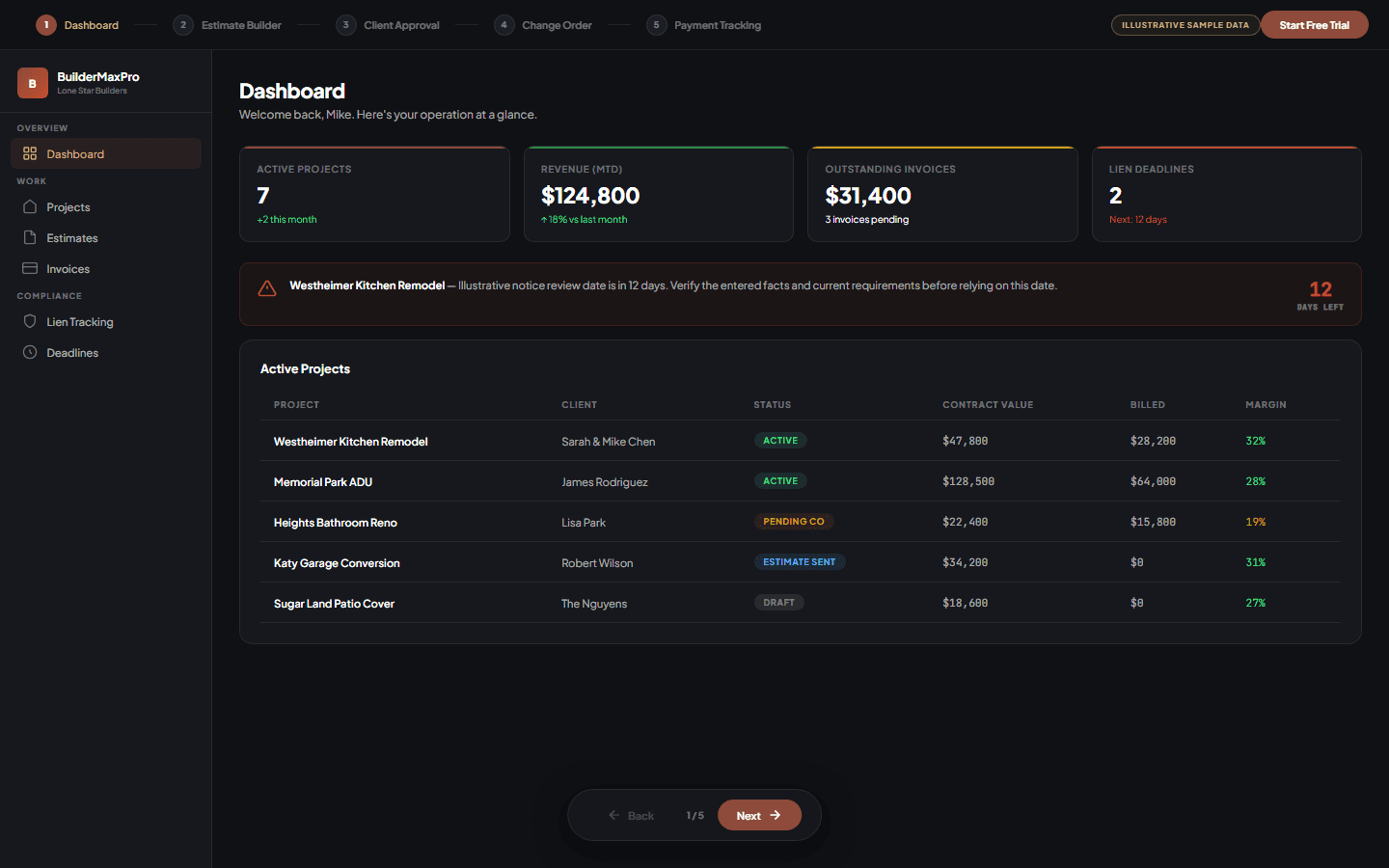
1. Review the sample project dashboard
Start with projects, estimates, invoices and deadline reminders in one view. The figures shown here are fictional examples.
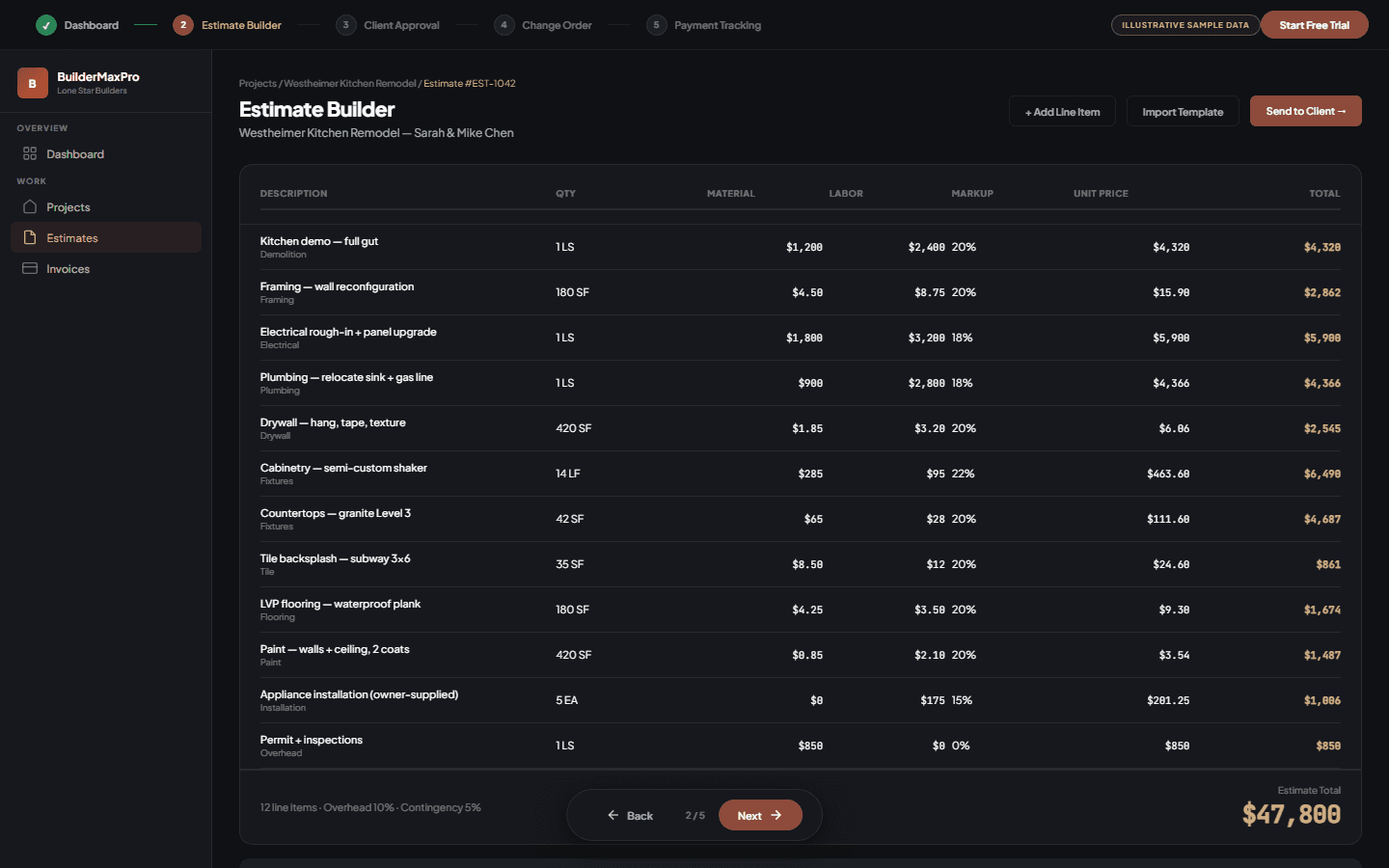
2. Build and review the estimate
Organize scope, quantities, material and labor inputs, markup and the estimate total. A contractor reviews every amount before sending it.
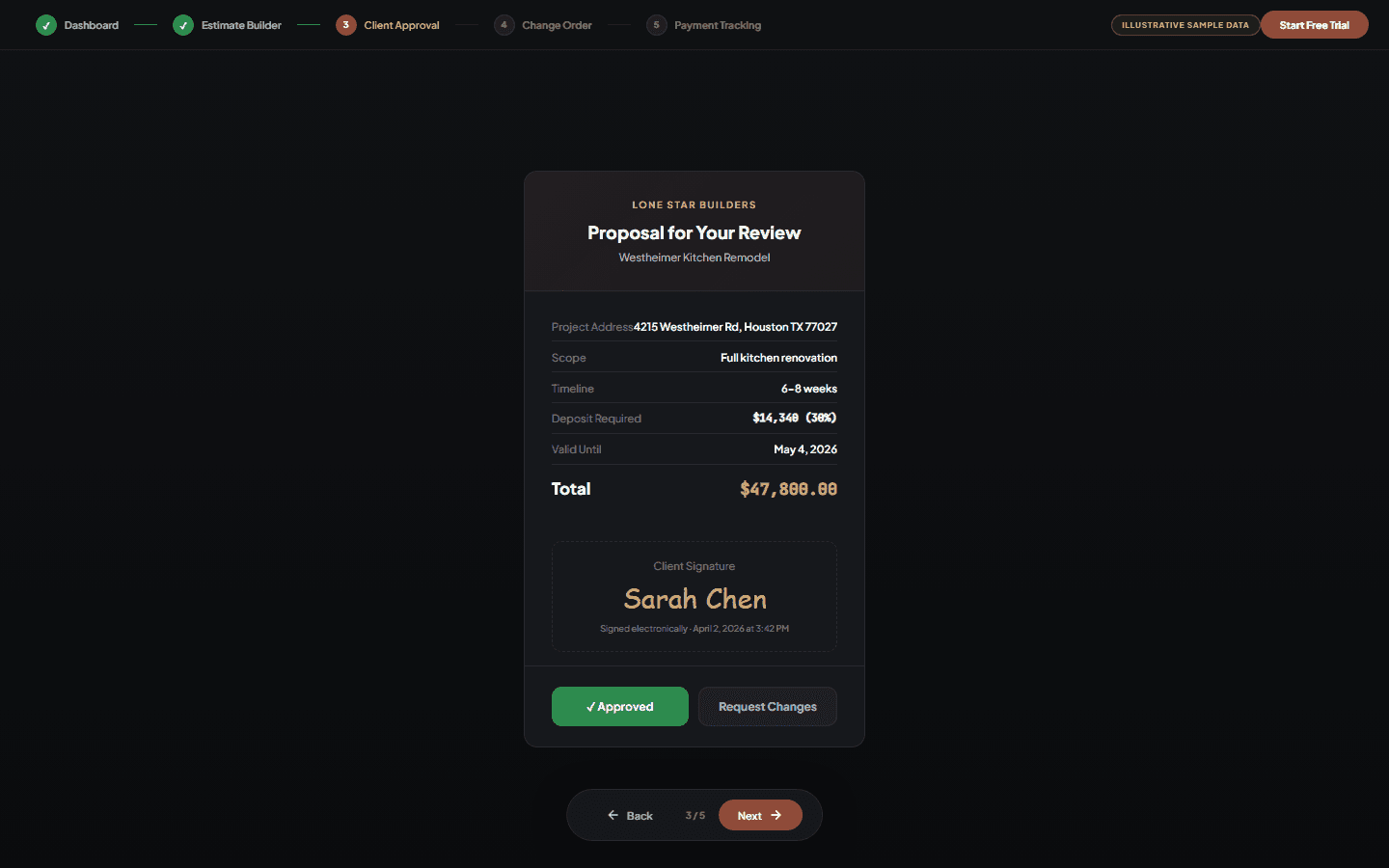
3. Capture the client's proposal decision
Present the scope, price, schedule and deposit request through the client workflow, then retain the recorded approval or requested changes.
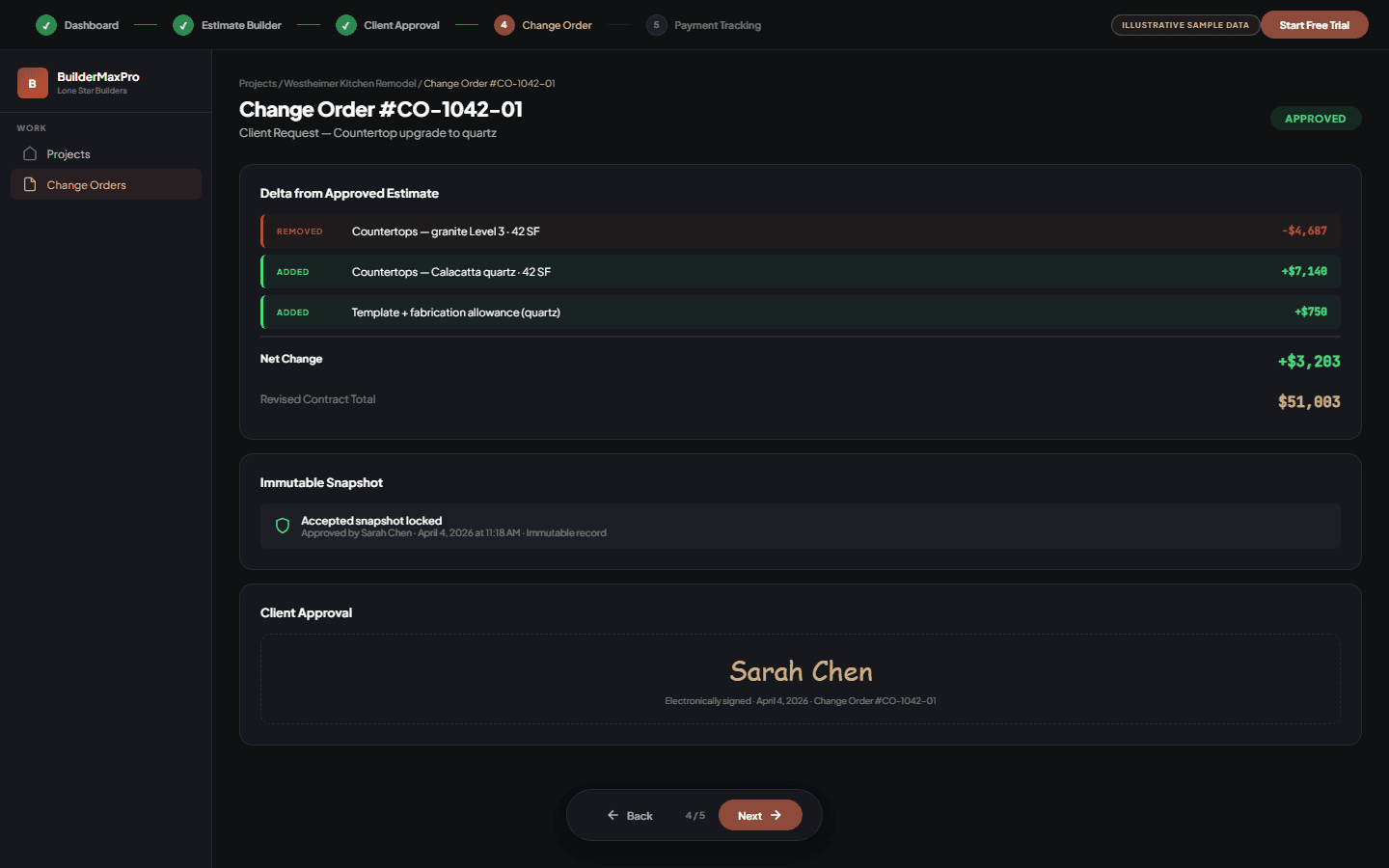
4. Document the approved change
Show removed and added scope, the net change and the revised contract total, with the approval record connected to the project.
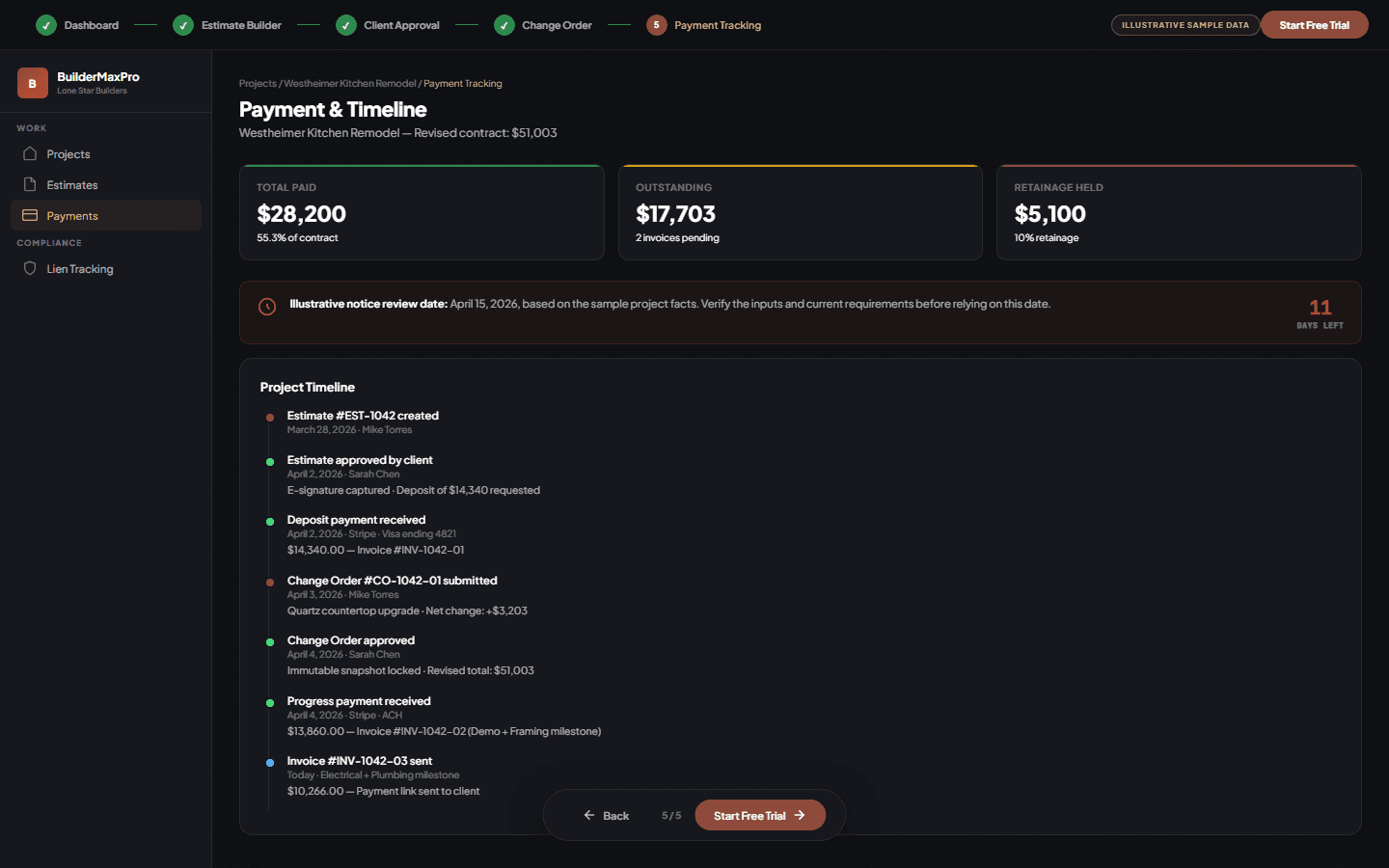
5. Track invoices, payments and calculated dates
Keep invoice and payment events on the project timeline alongside dates calculated from the entered Texas project facts. Review the facts and current requirements before relying on a deadline.
Walkthrough transcript
1. Review the sample project dashboard
Start with projects, estimates, invoices and deadline reminders in one view. The figures shown here are fictional examples.
2. Build and review the estimate
Organize scope, quantities, material and labor inputs, markup and the estimate total. A contractor reviews every amount before sending it.
3. Capture the client's proposal decision
Present the scope, price, schedule and deposit request through the client workflow, then retain the recorded approval or requested changes.
4. Document the approved change
Show removed and added scope, the net change and the revised contract total, with the approval record connected to the project.
5. Track invoices, payments and calculated dates
Keep invoice and payment events on the project timeline alongside dates calculated from the entered Texas project facts. Review the facts and current requirements before relying on a deadline.
Questions about the workflow
Can I manage estimates, invoices and Texas lien deadlines in one app?
Yes. BuilderMaxPro combines estimates, invoices and project records with supported Texas construction lien notice and filing deadline tools in its web platform. Features and usage limits vary by plan. You enter and review the project facts used by the deadline workflow.
Can I create an invoice from an existing estimate?
Yes. The estimate workflow includes a Create Invoice action. Review the amount, due date, terms and notes before creating or sending the invoice. This helps carry the estimate into billing; it does not mean the client has paid.
Does BuilderMaxPro file a construction lien for me?
No. The published offering is self-service software and educational resources. It does not include a managed county lien filing service, attorney review or legal representation. Creating a project, invoice or deadline reminder does not file a lien or establish that a required notice was delivered.
Are the lien deadline tools available for every state?
The construction lien deadline tools described here cover supported Texas workflows. Do not apply the Texas calculator to a project in another state. Project details and exceptions can affect the result; review the linked methodology and limitations.
What can I try before creating an account?
The public Texas lien deadline calculator requires no account. To save projects, prepare estimates and manage invoices in a workspace, create an account and choose a plan. BuilderMaxPro offers a Free plan and 14-day trials of paid plans; the pricing page lists current features and limits.
Ready to try it?
Start with the Free plan or explore a 14-day trial of a paid plan. Compare the included features and limits before choosing.